


How do I hide ads and notifications in WordPress?
How to Turn Off Notifications and Ads in WordPress Dashboard ?
What are these notifications?
If you’ve ever logged into your WordPress dashboard, you’ve probably seen messages that appear at the top of the page — some asking you to upgrade a plugin, others inviting you to try a new tool, and others advertising premium features.
These are called admin notices. They’re usually completely harmless, but they can become quite annoying and affect the performance of your admin area, especially when you have a lot of plugins installed!
Why do they appear?
Most plugins and themes you install on WordPress want to notify you about:
New releases and upgrades
Offers and premium versions of them
Ratings or requests to leave a review
Settings that need your attention
Manufacturer advertisements.
It's not your fault — it's something theme/plugin developers do automatically and often maliciously.
The Solution: The pr_disable_admin_notices Setting
If your website uses a custom plugin or theme that contains this setting, you can easily disable all of these notifications in one step.
💡 In simple terms: This code snippet is like a "switch" that turns off all annoying notifications at once.
How to Activate It — Step by Step
Step 1: Log in to your WordPress dashboard (usually: yourwebsite.gr/wp-admin)
Step 2: From the menu on the left, go to Settings
Step 3: Search for the active theme.
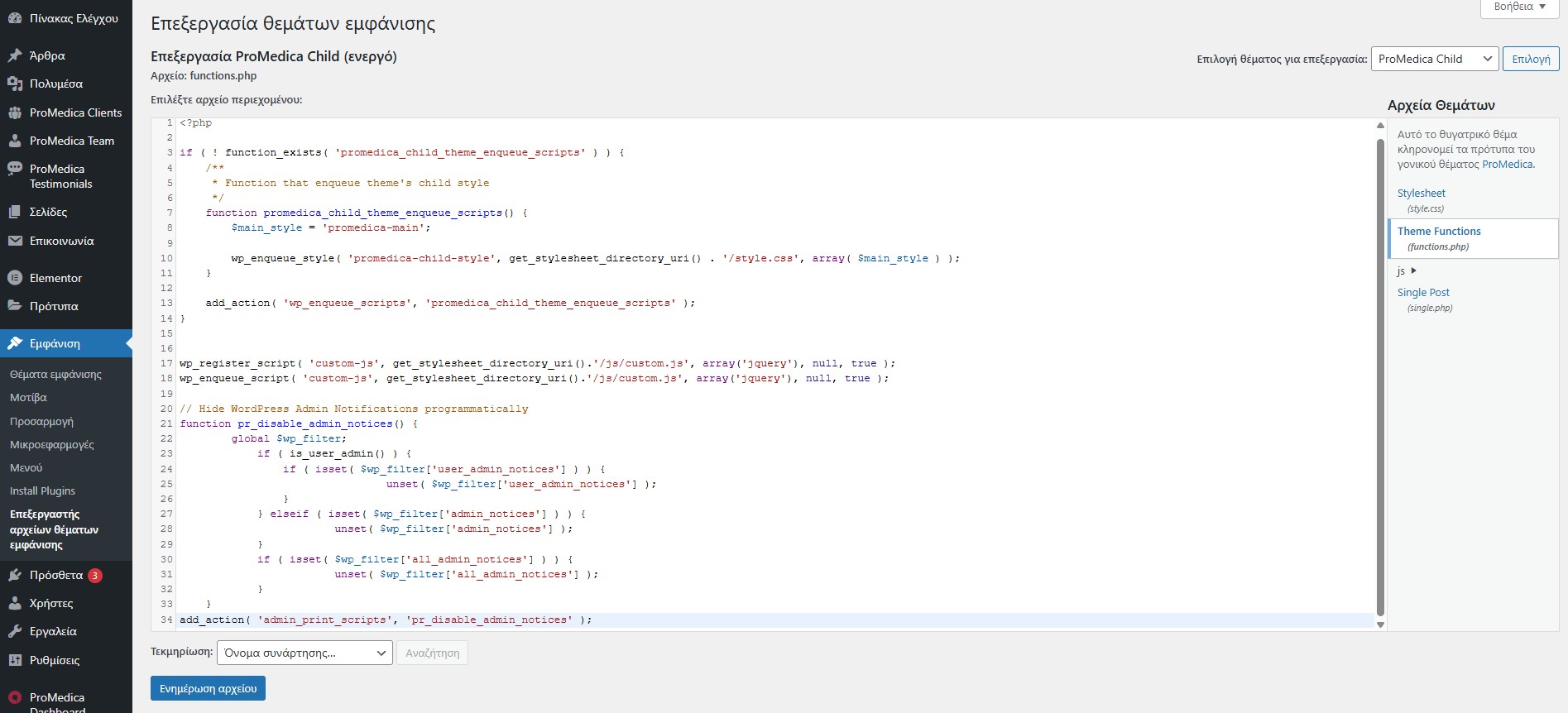
Step 4: Go to Edit Themes and select Theme Options > functions.php on the right
Step 5: At the end of the file, place the following code:
// Hide WordPress Admin Notifications programmatically
function pr_disable_admin_notices() {
global $wp_filter;
if ( is_user_admin() ) {
if ( isset( $wp_filter['user_admin_notices'] ) ) {
unset( $wp_filter['user_admin_notices'] );
}
} elseif ( isset( $wp_filter['admin_notices'] ) ) {
unset( $wp_filter['admin_notices'] );
}
if ( isset( $wp_filter['all_admin_notices'] ) ) {
unset( $wp_filter['all_admin_notices'] );
}
}
add_action( 'admin_print_scripts', 'pr_disable_admin_notices' );
Done! From now on, your dashboard will be much cleaner.
What will change next?
✅ You will no longer see ads from plugins
✅ There will be no messages asking you to rate tools
✅ Your dashboard will look cleaner and more organized
⚠️ Important: WordPress security or fatal errors** notifications may still appear — that's a good thing! You don't want to miss anything important.
Need help?
If you can't find this setting or something isn't working as you expect, don't hesitate to contact support. We're here to help! 😊