


PrestaShop Error 500
Symptoms:
– My Prestashop website displays error 500
– The error_log in PHP displays generic error GET / HTTP/2
Affects: WebHosting | Linux Plesk Reseller Hosting
Debugging error 500
The error 500 is a generic server error, which means that the problem can be anything.
To identify what exactly is the problem, we need to perform the following two actions.
– To see the error logs in PHP if they reproduce errors that will show us what is the problem. – To enable the debugging mode in Prestashop so that instead of seeing the general error message, the real problem is displayed.
Reading PHP error_log Plesk
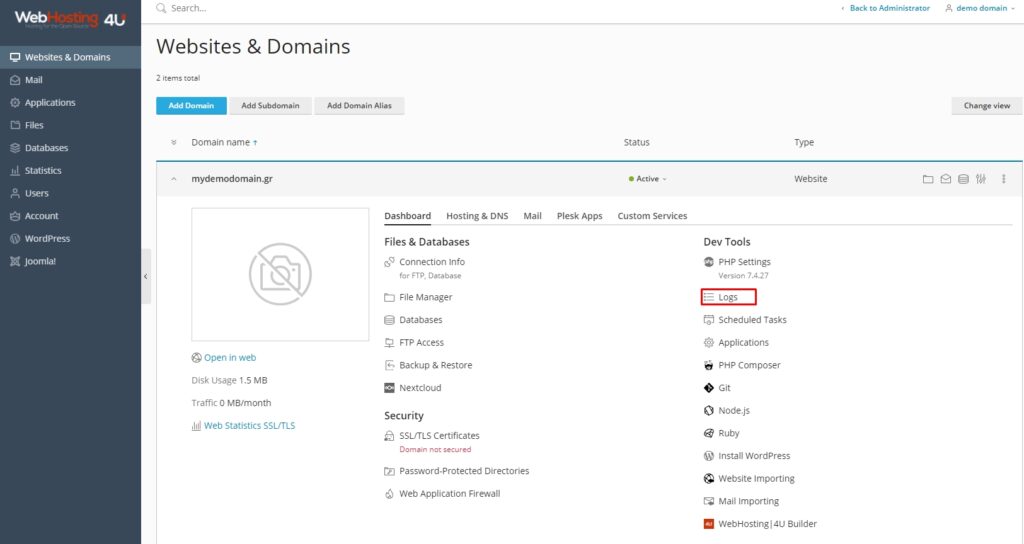
The error logs that are reproduced in PHP can be read from the Plesk panel.
Websites & Domains -> select domain -> logs
From the dropdown menu on the right, we select to see only the errors
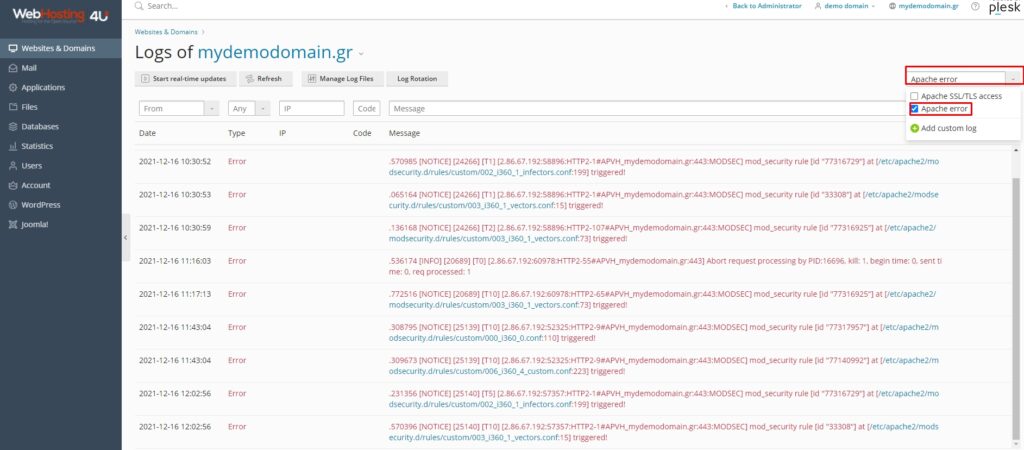
If the error logs show us what is the real problem and we have identified what it is, we can proceed to its solution.
If the PHP error logs display a general error message, we proceed to the next step, the activation of the debugging in Prestashop.
Prestashop debugging activation
The activation of the debugging mode in Prestashop is very easy.
The only thing that needs to be done is to change a parameter.
From the Plesk filemanager, we find the following file and edit it
httpdocs -> config -> defines.inc.php
We change the line
define('_PS_MODE_DEV_', false);
to
define('_PS_MODE_DEV_', true);
We open the Prestashop in our browser.
It will have displayed the real error.
If we have not seen this error message before, we copy it and search in a search engine to see what it is.
Prestashop 1.4 - 1.5.3
In these older versions, the activation of the debug mode is done by editing the file httpdocs -> config -> config.inc.php
We find and change the line
@ini_set('display_errors', 'off');
to
@ini_set('display_errors', 'on');
After we fix the problem, we must remember to turn off the debugging mode