


How can I clone a WordPress site in Plesk panel?
Question: How can I copy a WordPress site to a second domain or subdomain that I have on my hosting account?
Affects: Linux Plesk Reseller Hosting | Plesk WebHosting
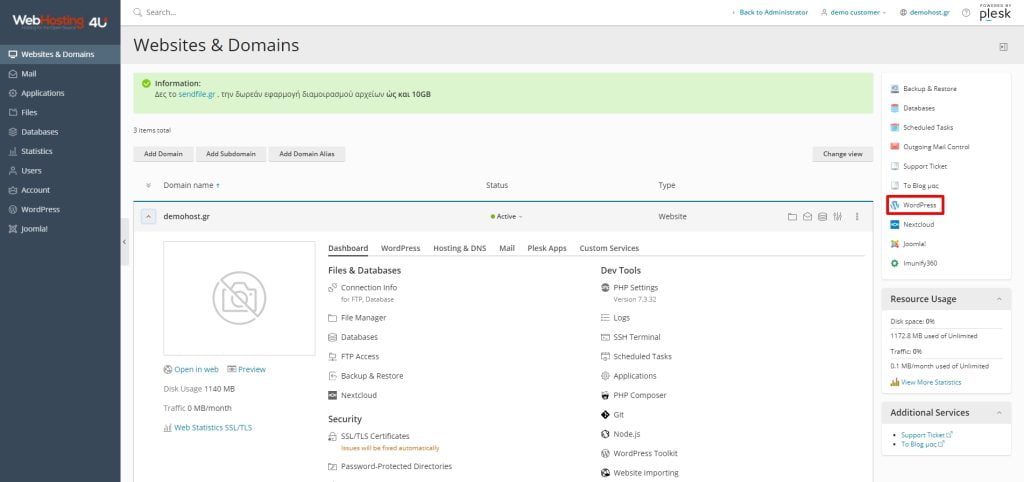
After logging in to our Plesk panel, we go to Websites & Domains -> domain.
If we see the Plesk with Active View, we can directly click on the Clone button

If we see it as Dynamic List, we open the domain's tab and click on the second tab that says WordPress. On the second tab, we will see the Clone option

The same can be done from the right menu, from the WordPress Menu regardless of the view we see the Plesk panel.
After the new page with the Clone settings opens, we select what we want to do.
- Copy to a new subdomain.
- Copy to an existing domain or subdomain

We press OK to start the cloning process.
The WordPress toolkit will copy all the WordPress data to the new selection we made.
At the same time, it will make all the necessary changes to the WordPress structure so that it matches the domain or subdomain we selected.
There are cases where the WordPress toolkit cannot rename internal URLs of some images due to the design of a plugin, e.g. Slider Revolution.
In this case, we need to go ourselves inside the relevant plugin and make the corrections ourselves.