


How to Secure Foreign Domain Names with Latin Characters?
Question: I want to secure a foreign domain name, e.g., .com, .net, .shop. My customer profile in WebHosting|4U is in Greek characters. How can I secure it with Latin characters for me or my customer?
Affects: Domain Names
You maintain a customer account with WebHosting|4U and access our customer area through this account.
The details you have declared in this account (name, address, email, phone) are used to secure a domain name as the owner's details.
In the case where we want to secure a foreign domain name, Greek characters are not accepted, and we must declare the domain owner with Latin characters.
To secure a foreign domain name, e.g., .shop, .com, .net, .blog, and others, you simply need to create a new owner profile.
In the last step of the domain purchase, in the "Domain Owner Details" field, select "Add new owner profile" from the small menu.
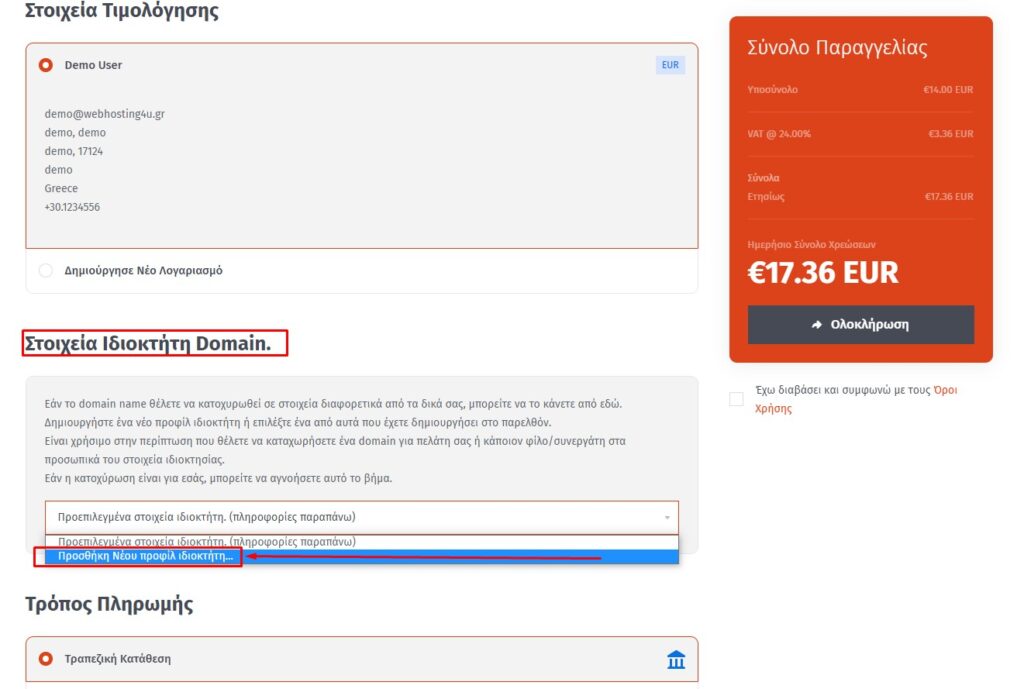
These new details are stored and can be used for future foreign domain securities for you or your customer.
No further action is required; you can continue the purchase process normally.